

Lessons
HTML
- HTML HOME
- HTML Introduction
- HTML Editors
- HTML Basic
- HTML Elements
- HTML Attributes
- HTML Headings
- HTML Paragraphs
- HTML Styles
- HTML Formatting
- HTML Quotations
- HTML Comments
- HTML Colors
- HTML CSS
- HTML Links
- HTML Images
- HTML Tables
- HTML Lists
- HTML Blocks
- HTML Classes
- HTML Id
- HTML Iframes
- HTML JavaScript
- HTML File Paths
- HTML Head
- HTML Layout
- HTML Responsive
- HTML Computercode
- HTML Entities
- HTML Symbols
- HTML Charset
HTML5
HTML Graphics
HTML Media
HTML APIs
HTML Examples
HTML References
- HTML Tag List
- HTML Events
- HTML Colors
- HTML Canvas
- HTML Audio/Video
- HTML Doctypes
- HTML Character Sets
- HTML URL Encode
- HTML Lang Codes
- HTML Messages
- HTML Methods
- PX to Em Converter
- Keyboard Shortcuts
HTML Forms
HTML Layout
HTML Layouts
HTML Layout Example
City Gallery
London
London is the capital city of England. It is the most populous city in the United Kingdom, with a metropolitan area of over 13 million inhabitants.
Standing on the River Thames, London has been a major settlement for two millennia, its history going back to its founding by the Romans, who named it Londinium.
HTML Layout Elements
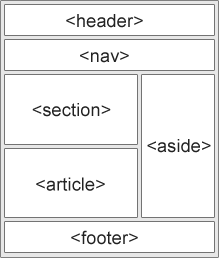
Websites often display content in multiple columns (like a magazine or newspaper).
HTML5 offers new semantic elements that define the different parts of a web page:
 |
|
HTML Layout Techniques
There are four different ways to create multicolumn layouts. Each way has its pros and cons:
- HTML tables
- CSS float property
- CSS framework
- CSS flexbox
Which One to Choose?
HTML Tables
The <table> element was not designed to be a layout tool! The purpose of the <table> element is to display tabular data. So, do not use tables for your page layout! They will bring a mess into your code. And imagine how hard it will be to redesign your site after a couple of months.
Tip: Do NOT use tables for your page layout!
CSS Frameworks
If you want to create your layout fast, you can use a framework, like W3.CSS or Bootstrap.
CSS Floats
It is common to do entire web layouts using the CSS float property. Float is easy to learn - you just need to remember how the float and clear properties work. Disadvantages: Floating elements are tied to the document flow, which may harm the flexibility. Learn more about float in our CSS Float and Clear chapter.
Float Example
City Gallery
London
London is the capital city of England. It is the most populous city in the United Kingdom, with a metropolitan area of over 13 million inhabitants.
Standing on the River Thames, London has been a major settlement for two millennia, its history going back to its founding by the Romans, who named it Londinium.
CSS Flexbox
Flexbox is a new layout mode in CSS3.
Use of flexbox ensures that elements behave predictably when the page layout must accommodate different screen sizes and different display devices. Disadvantages: Does not work in IE10 and earlier.
Learn more about flexbox in our CSS Flexbox chapter.
Flexbox Example
City Gallery
London
London is the capital city of England. It is the most populous city in the United Kingdom, with a metropolitan area of over 13 million inhabitants.
Standing on the River Thames, London has been a major settlement for two millennia, its history going back to its founding by the Romans, who named it Londinium.