

Lessons
CSS Tutorial
- CSS Home
- CSS Introduction
- CSS Syntax
- CSS How To
- CSS Colors
- CSS Backgrounds
- CSS Borders
- CSS Margins
- CSS Padding
- CSS Height/Width
- CSS Box Model
- CSS Outline
- CSS Text
- CSS Fonts
- CSS Icons
- CSS Links
- CSS Lists
- CSS Tables
- CSS Display
- CSS Max-width
- CSS Position
- CSS Overflow
- CSS Float
- CSS Inline-block
- CSS Align
- CSS Combinators
- CSS Pseudo-class
CSS Advanced
CSS Responsive
CSS Grid
CSS References
CSS Properties
CSS Float
CSS Layout - float and clear
The CSS float property specifies how an element should float.
The CSS clear property specifies what elements can float beside the cleared element and on which side.
The float Property
The float property is used for positioning and layout on web pages.
The float property can have one of the following values:
- left - The element floats to the left of its container
- right- The element floats to the right of its container
- none - The element does not float (will be displayed just where it occurs in the text). This is default
- inherit - The element inherits the float value of its parent
In its simplest use, the float property can be used to wrap text around images.
Example - float: right;
The following example specifies that an image should float to the right in a text:
 Lorem ipsum dolor sit amet, consectetur adipiscing elit. Phasellus imperdiet, nulla et dictum interdum, nisi lorem egestas odio, vitae scelerisque enim ligula venenatis dolor. Maecenas nisl est, ultrices nec congue eget, auctor vitae massa.
Example
img {
float: right;
}Example - float: left;
The following example specifies that an image should float to the left in a text:
Lorem ipsum dolor sit amet, consectetur adipiscing elit. Phasellus imperdiet, nulla et dictum interdum, nisi lorem egestas odio, vitae scelerisque enim ligula venenatis dolor. Maecenas nisl est, ultrices nec congue eget, auctor vitae massa.
Example
img {
float: left;
}Example - No float
In the following example the image will be displayed just where it occurs in the text (float: none;):
Lorem ipsum dolor sit amet, consectetur adipiscing elit. Phasellus imperdiet, nulla et dictum interdum, nisi lorem egestas odio, vitae scelerisque enim ligula venenatis dolor. Maecenas nisl est, ultrices nec congue eget, auctor vitae massa.
Example
img {
float: none;
}The clear Property
The clear property specifies what elements can float beside the cleared element and on which side.
The clear property can have one of the following values:
- none - Allows floating elements on both sides. This is default
- left - No floating elements allowed on the left side
- right- No floating elements allowed on the right side
- both - No floating elements allowed on either the left or the right side
- inherit - The element inherits the clear value of its parent
The most common way to use the clear property is after you have used a float property on an element.
When clearing floats, you should match the clear to the float. If an element is floated to the left, then you should clear to the left. Your floated element will continue to float, but the cleared element will appear below it on the web page.
The following example clears the float to the left. Means that no floating elements are allowed on the left side (of the div):
Example
div {
clear: left;
}The clearfix Hack
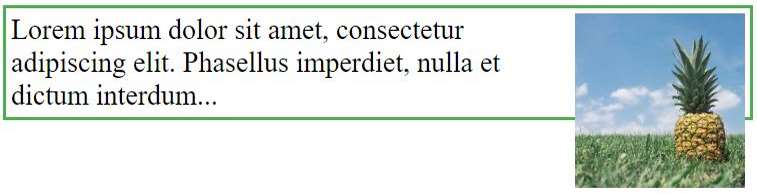
If an element is taller than the element containing it, and it is floated, it will overflow outside of its container.
Without Clearfix
With Clearfix
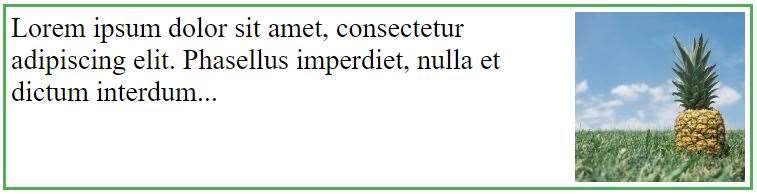
Then we can add overflow: auto; to the containing element to fix this problem:
Example
.clearfix {
overflow: auto;
}The overflow:auto clearfix works well as long as you are able to keep control of your margins and padding (else you might see scrollbars). The new, modern clearfix hack however, is safer to use, and the following code is used for most webpages:
Example
.clearfix::after {
content: "";
clear: both;
display: table;
}You will learn more about the ::after pseudo-element in a later chapter.
Images Side By Side



With the float property, it is easy to float images side by side:
Example
.img-container {
float: left;
width: 33.33%; /* three containers (use 25% for four, and 50% for two, etc) */
padding: 5px; /* if you want space between the images */
}Navigation Menu
Use float with a list of hyperlinks to create a horizontal menu:
Example
Web Layout Example
It is also common to do entire web layouts using the float property:
Example
.header, .footer {
background-color: grey;
color: white;
padding: 15px;
}
.column {
float: left;
padding: 15px;
}
.clearfix::after {
content: "";
clear: both;
display: table;
}
.menu {
width: 25%;
}
.content {
width: 75%;
}All CSS Float Properties
| Property | Description |
|---|---|
| clear | Specifies what elements can float beside the cleared element and on which side |
| float | Specifies how an element should float |
| overflow | Specifies what happens if content overflows an element's box |
| overflow-x | Specifies what to do with the left/right edges of the content if it overflows the element's content area |
| overflow-y | Specifies what to do with the top/bottom edges of the content if it overflows the element's content area |